Get started
 Log in
May 17, 2021 • read
Technology Tips: May 2021 Edition
|
Skyward IT Services Network and Infrastructure Security Specialists |

Skyward IT Services
Cookies coming to an end?
People concerned with data security (and impulse buyers) can rejoice—cookies might be on their way out. We’re not referring to the delicious variety, but rather the annoying kind that pops up on every new web page and tracks your data.Cookies are small pieces of data, such as usernames, passwords, and your browsing history, which are used to enhance your browsing experience. You've likely noticed pop-ups on websites you visit, asking you to allow or deny the use of cookies. If you’ve ever wondered how and why you receive such specific and targeted ads, cookies are to blame. First-party cookies are created from the website you are browsing and are generally very safe. Third-party cookies, on the other hand, can be a bit more cumbersome as they let advertisers track an individual's browsing history and shopping tendencies.
In January 2020, Google discussed their plans to end support for third-party cookies in Chrome by 2022. Google will still track data with first-party cookies, so they won't be as negatively affected as digital advertisers. Many experts are praising Google for this ethical decision, and other organizations are following suit.
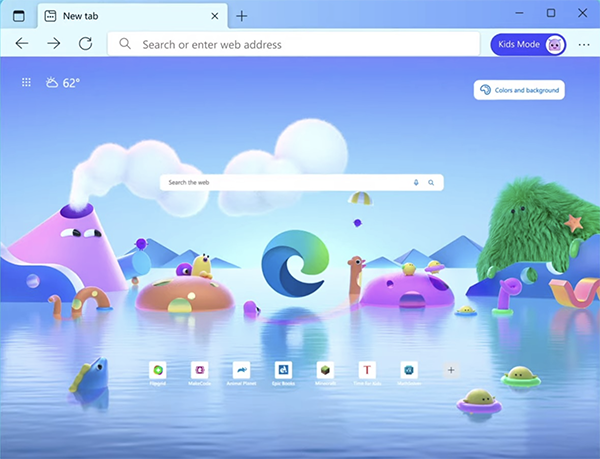
Microsoft Edge: Kids Mode
Kids Mode is a fantastic new tool in Microsoft Edge designed to help busy parents keep curious kids safe on the internet. Kids can browse a variety of parent-approved websites without a guardian monitoring them. If they arrive at a site that isn’t on the list, parents can enter their PIN to give access. To enable Kids Mode, click on your profile image in Edge and specify the age range of your child.Kids can browse safely with the most strict security features enabled. They can also customize their browsing experience with fun themes and colors. Kids Mode even has a news section to keep kids informed and learning.
To learn more, visit this webpage from Microsoft.
Dictate your documents with Voice Commands
Did you know you can save time typing your emails and Word documents by talking them out? Office’s dictation feature not only lets you create drafts with ease, but it makes writing much more accessible for those who may not be able to type. It’s also a speedy way to get your thoughts on paper and ready to organize. To use the dictation feature, click on the microphone button (pictured below: left for desktop, right for web version) or go to Edit > Start Word Dictation.You can use a variety of commands, such as “italicize last sentence,” “start a list,” “period,” or “bold ___.” For the best experience, make sure you have updated to Microsoft 10. Here is a full list of voice commands to use.

Cryptocurrency attacks are on the rise
Hide your kids, hide your coins: Cryptocurrency hacking is the new get-rich-quick scheme... if you are into jail time, that is. Ransomware group Darkside just cashed in $90 million in Bitcoin after utilizing ransomware-as-a-service over a nine-month period. The ransom payments came from 47 victims, with an additional 52 organizations having reported being attacked. If you are looking for ways to keep your cryptocurrency secure, this article has you covered.Thinking about edtech for your district? We'd love to help. Visit skyward.com/get-started to learn more.
|
Skyward IT Services Network and Infrastructure Security Specialists |