Get started
 Log in
July 01, 2026 • read

Qmlativ Spotlight: Grade Calculation Overrides
|
Kaylie Wiedmeyer Edtech Thought Leader |

Kaylie Wiedmeyer

In the classroom, unique grading situations can arise that don’t always work with a one-size-fits-all approach. That’s why we’re excited to share Qmlativ’s grading feature — Student Calculation Overrides — so districts can introduce grading flexibility while maintaining consistency and fairness in their classrooms.
What are Student Calculation Overrides?
There are a number of reasons a student may miss consistent periods of instruction. As a result, school districts often run into scenarios where they need to adjust grade calculations differently from the standard calculations, whether it be for a student’s medical absence, mid-semester transfers, late course enrollments, or school-sponsored activities.
The Student Calculation Overrides feature enables district administrators to create flexible solutions while reducing the need for teachers to create manual or inconsistent gradebook fixes.
For example, if a student transferred to a new school mid-semester, they would need a grade calculation adjustment that considered their absence from classes during the first quarter.
A district administrator could adjust grade calculations for that student’s classes without impacting how other students’ grades are calculated.
Picture the following grade calculation for the student’s Algebra class during the first semester:
Quarter 1 - 40%
Quarter 2 - 40%
End of Semester Exam - 20%
Since the student didn’t enroll and start attending class until the second quarter, a district administrator could adjust their grade calculations:
Quarter 2 – 75%
End of Semester Exam – 25%
Now, the student can be graded in a way that’s tailored to their unique circumstance so the student isn’t penalized, and gradebook consistency is maintained.
Student Calculation Overrides can also be applied to cohorts of students who miss classes for school-sponsored activities such as sports and club events, so administrators can apply the appropriate calculation override at the group level.
The Value for Schools
The Student Calculations Override feature provides districts with flexibility that reaches all levels. Administrators make quick adjustments that respect teachers’ judgment and maintain academic standards, and teachers spend less time performing manual fixes for multiple students.
Most importantly, it provides students with the flexibility they need to get the full value out of their education. Inside schools, academics matter, but so do extracurricular activities. Extracurriculars help students find community, build self-esteem, develop new skills, and explore who they are beyond a letter grade.
A student who leaves school early to attend a mock trial competition isn’t just missing class. They’re gaining a valuable opportunity to explore their interests, build public speaking skills, and practice team leadership within a school-sponsored community.
With flexible grading options, students can pursue additional opportunities and still meet academic expectations. In turn, schools adopt a culture that recognizes the whole student — what they need not just to succeed in the classroom, but to thrive as passionate and curious individuals in the spaces beyond.
How does it work?
Inside Qmlativ, navigate to the Qmlativ Gradebook feature and select Entity Group Configurations > Calculations Group > Grade Buckets.
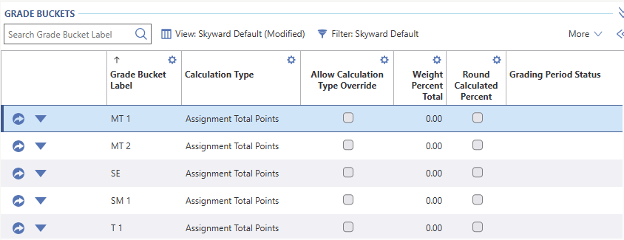
Now, you can set up a filter to specify which sections and students an override should apply to. Once the filter has been selected and run, you will be able to set a Student Calculation Override for those specific sections and students.
All Student Calculation Overrides appear in the Calculations tab, so teachers, parents, and students can view how their grades are being calculated with transparency.
With Student Calculations Overrides, administrators can make grade adjustments that respect teachers and support students' enrichment while ensuring academic standards are met.
Thinking about edtech for your district? We'd love to help. Visit skyward.com/get-started to learn more.
|
Kaylie Wiedmeyer Edtech Thought Leader |