Get started
 Log in
July 01, 2026 • read

Qmlativ Spotlight: Career Plan Templates
|
Abby Paulsen Edtech Thought Leader |

Abby Paulsen

Master schedules already reflect a solid set of core courses to satisfy graduation requirements — such as 9th grade English, Math, or Science — but what about the electives?
Schools are interested in adding diverse electives and collegiate courses into high school students’ schedules to prepare them for the workforce or undergraduate experience.
Counselors juggle a handful of students, which makes scheduling without a digital template difficult.
Qmlativ’s new Career Plan Templates serve as a roadmap for students, making it easy to see the courses they need to meet their graduation requirements. Then, students can fill in the gaps with classes that inspire their career path.
Product Overview
The Career Plan Templates provide districts with the ability to create a structured blueprint, mapping out the required classes for graduation and adding waypoints for individual students’ career plans. These course templates are reusable and can be mass-assigned to students.
Students can easily see their requirements and fit in classes that suit their career goals like agriculture, business, or health sciences. This also helps them view what core classes they can switch out for Advanced Placement courses or credential programs.
This functionality enables districts to apply these templates to individual students, giving them a solid starting point while maintaining flexibility.
How does it work?
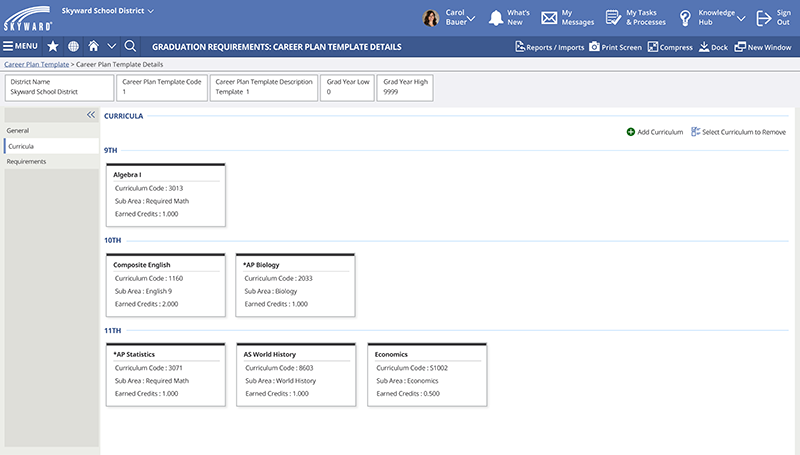
By navigating to Graduation Requirements, Career Plan Templates, and clicking Add Career Plan Template, districts can start building these out by Grade Level, Graduation Plan Area/Sub-Area:
Input required classes like Algebra I for 9th grade and then specialized classes like AP Biology for 10th grade, and so on. Students can see the sub-area of each class and view what's required or optional throughout their plan.
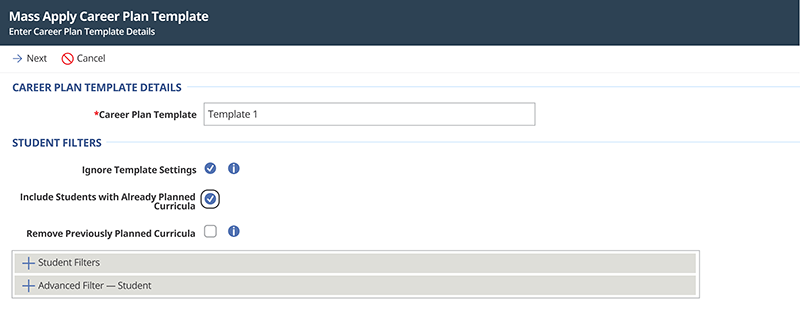
Once the district has completed the template, they can navigate to the Graduation Requirements module and click on the “Mass Apply Career Plan Template” Utility to assign the template to the applicable Students:
Access to career exploration is key in K12 schools, so students can discover their talents and passions before having to make concrete decisions about their future.
Districts can establish a strong foundation for student planning based on known requirements and create a more engaging and actionable career planning experience for students.
Follow-up Resources:
College & Career Readiness
Future-Ready Students Seek Credentials
Rethinking Credentials for Careers of the Future
Stay in touch and subscribe to Skyward Insider for more product updates and K12 topics.
Thinking about edtech for your district? We'd love to help. Visit skyward.com/get-started to learn more.
|
Abby Paulsen Edtech Thought Leader |