Get started
 Log in
January 17, 2021 • read

Position Management and Traveling Staff
|
Casey Thompson Digital Media Manager |

Casey Thompson

Time tracking.
It’s one of the greatest expenses in a district, and also one of the most susceptible to fraud and waste. If you’re not taking advantage of Skyward’s time tracking, position management, and budgeting features, please read on! We're here to help.
The Importance of Accurate Time Tracking
Each hour an employee works adds up. In the case of traveling employees (think school nurses, psychologists, social workers, long-term substitutes, coaches, even teachers), tracking their time spent at each building or site in the district can be a tedious process when done manually.Position management affects board members, administrators, school business officers, staff, and even parents. Whether employees punch in and out at each location or are exempt, each school they visit is sharing the budget allocation for their time. As good stewards of the community’s district budget, your business office will want to be exact about the expenditure for each school.
So let’s make it easy! Here’s how you can use Skyward to automate position management processes, so you can focus on other important, impossible-to-automate tasks instead.
True Time
True Time automates the timekeeping process. Employees can use their computers, smartphones, or the True Time kiosk to clock in and out each day. Date- and time-stamped timesheets are then submitted to supervisors—without one piece of paper. It’s a simple way to be sure every minute is accounted for and can be referenced when making decisions down the road.Check out Middleton-Cross Plains’ True Time journey!
Full-Time Employment (FTE) Control
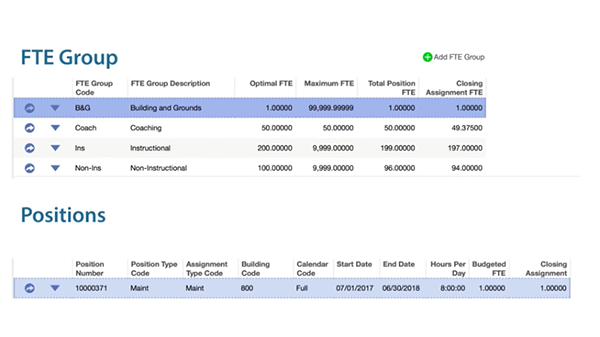
Perhaps one of the first things you work toward in your budgeting meetings is the total number of FTE available at your district, building, department, etc. From there, you can start the planning process to see where additions and possible cuts can be made. Imagine coming up with a plan nearly everyone is on board with, only to later discover you’re over budget. (No wonder it was so easy for everyone to agree!)Tying the different types of positions to the budget forecast helps account for up to 85% of a district’s budget dedicated to salaries. By entering the FTE cap into Skyward, you can be sure you’re never in an over-budget scenario.
Vacant Position Budgeting
When budgeting for a new year, you often have unfilled staff positions that must be accounted for. With vacant position budgeting, you can rest assured knowing you’re never leaving a position out of the budget. You can also use this tool to experiment with potential hiring options to see how each would affect the budget.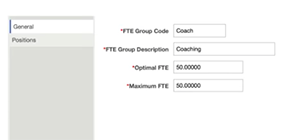
Ready to get to work? Here are a couple other tips to keep in mind:
Keep accurate documentation: As roles change throughout the years, positions may shift from part time to full time, or vice versa. Track these changes and keep the records attached to the position, along with the description, the number of people assigned to this position, which sites are relevant to the position, where each position’s salary comes from, and so on.
Be sure scheduling is correct: The position record contains the common schedule for each employee assigned. This may be a 12-month schedule, a 9-month schedule, or some other configuration. It needs to be the same for each position record.
The unique nature of school districts means positions will often be shared across buildings—depending on the size of the district, this adds up to major budget impacts. Use time tracking, position management, and budgeting tools to streamline the process and free up the moments of human connection crucial to making strong hiring decisions.
Follow-up Resource: Better Remote Onboarding
Once HR doesn’t have to spend as much time on position management, they’ll be able to put energy into accelerating and polishing hiring and onboarding instead. Imagine the impact on school culture from the minute a candidate applies!Thinking about edtech for your district? We'd love to help. Visit skyward.com/get-started to learn more.
|
Casey Thompson Digital Media Manager |