Get started
 Log in
August 08, 2016 • read
Skyward and the LMS
|
Kevin Duda Product Line Manager |

Kevin Duda
Defining the Learning Management System
There are a lot of acronyms floating around out there, resulting in some confusion over what constitutes a learning management system (LMS). Teachers use an LMS to store and manage their courses during every phase of instruction: planning, implementing, and assessing. There is some overlap between an LMS and the modern SIS, with the biggest difference being that the LMS is more classroom-centric, based on courses and content rather than administrative tasks. Some examples of features to expect from a typical LMS include:- An online repository for class information with multimedia elements
- A drop box for completed assignments and papers
- Class discussion boards for increased engagement
- Tools that are formative and easy for teachers to use
Which LMS Goes Best with Skyward?
Glad you asked! There's more than one right answer.For starters, there is only one LMS made exclusively for Skyward: the Course Learning Center (CLC).
A familiar interface: The CLC has the same look and feel as everything else you do in Skyward. Teachers, parents, and students will all appreciate not having to learn a new layout, language, and features.
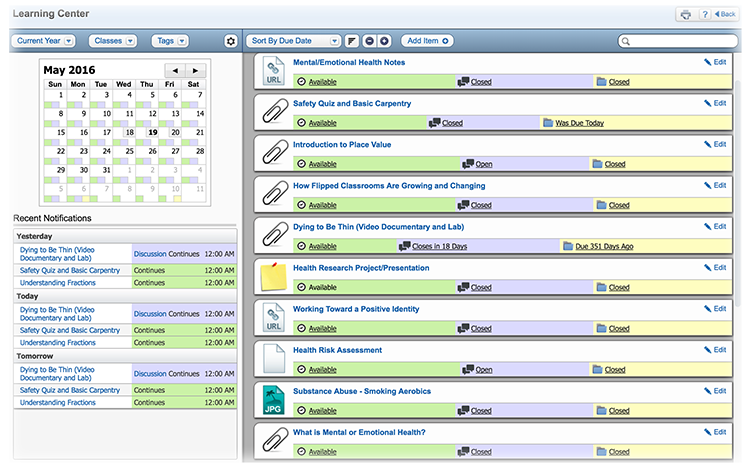
No dual-entry: Since the CLC is part of the Skyward system, teachers only have one place to enter course information (from grades and assignments to important dates and announcements). No more task duplication!
A one-stop shop: Kids and parents are already on board with Skyward – they’ll be visiting Family Access to check grades and other important information. With the CLC, they won’t have to add anything new to their routine – or keep track of another set of login credentials – to access their LMS.
Easy to use: When we examined the LMS market, we found that tech-savvy teachers were really getting the most out of some of the more popular solutions out there, but those who were less comfortable with technology saw the LMS as an obstacle to the instructional process. The CLC was designed for simplicity, striking a delicate balance of useful tools and intuitive design. It’s great for techies and traditionals alike.
Tip – go school-wide with your LMS! Having the whole school use the same LMS is beneficial for everyone. Teachers can help each other get the most from the system and use a common language when communicating with students, so students can more quickly become confident navigating the system. Parents and students will appreciate the consistency of the experience.
What if We Love our Current LMS?
We’re all about flexibility, convenience, and making your life as easy as possible. We know that many of our customers are already using an LMS – and their teachers are comfortable with it. That’s why we’ve teamed up with some of the most popular LMS providers to create an API integration between our product and theirs.What do we mean by “integration”? An LMS that’s integrated with Skyward eliminates the need for double entry of data, decreasing the chance of human error and saving your teachers valuable time for instruction. Information entered in Skyward, such as class rosters, will be automatically transferred to the LMS. When it comes to assignments and grades, teachers can just enter the assignments and scores into the LMS and they will automatically update in Skyward. If the grade or assignment is modified in the LMS, it will update in Skyward’s gradebook as well, so the two always remain in sync and up to date.
Here is a list of the LMS providers Skyward currently partners with. Keep in mind that this list is not exclusive – additional Skyward-LMS integrations are already underway and we'll be sure to announce any updates as they come.
If you are using any of these systems right now, contact us to learn about the impact a simple integration can have on your instructional time. After all, technology should always help, and never hinder, your efforts to give your students the best education.
Want more details on our LMS API? Interested in a demo of the Course Learning Center? Contact us today!
Thinking about edtech for your district? We'd love to help. Visit skyward.com/get-started to learn more.
|
Kevin Duda Product Line Manager |