Get started
 Log in
April 01, 2016 • read

Technology Tips: April 2016 Edition
|
Skyward IT Services Network Infrastructure and Security Specialists |

Skyward IT Services


Install Apps on Chrome for Offline Use
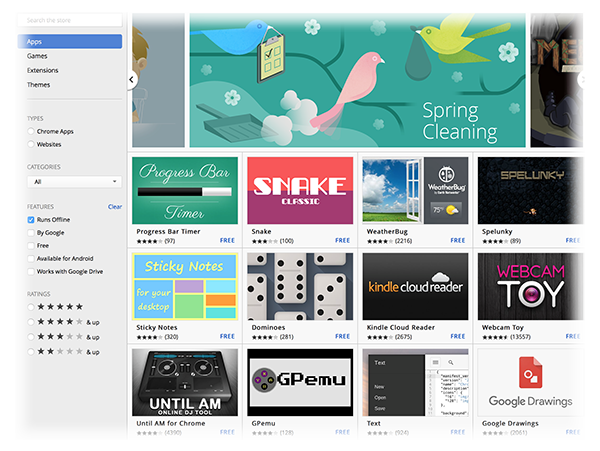
Did you know you can install apps on Google Chrome to use when you aren’t online? Picture yourself catching up on emails while on a field trip even though your phone can’t get service, or updating a Google Drive spreadsheet when the Internet connection is spotty. From Google Calendar to Vine, there are a wide variety of apps available. Some launch an existing webpage, while others run within the browser itself. To check out the apps available for offline use, go to the Chrome Web Store. Use the panel on the left to filter only apps available offline.
Visit the Chrome Web Store Help page for more information about adding apps to Chrome.
iPhone Hidden Tool – The Level

Calling all iPhone-using builders, designers, picture-hangers, and perfectionists. Did you know your phone is equipped with a level? You can leave your bubble device at home in the toolbox. By simply opening your phone’s compass, then swiping the screen to the left, you will access a trusty level to use at home or on the go. This convenient tool is perfect for maintenance workers or students in a technology class or makerspace!
Malware of the Month
This month, we are focusing on malware that’s delivered, not so conveniently, straight to your inbox. Though many of these emails are caught in spam folders, some of them still get through to your inbox. Locky ransomware is one such threat currently making its way around the web. It hides in an attachment and infects your computer when you click to open the file.The email itself comes in many disguises. A few of its more common masks include emails regarding:
- An invoice notification
- A payment slip or payment configuration
- A tax-related notification
- A billing statement
- A purchase order
To avoid Locky ransomware and other malware distributed via email, do NOT open any email attachments or links from unknown sources. Some malware appears to come from trusted sources, but the “sender” is unaware the message is being distributed. If you receive an unexpected email that includes a link or attachment from one of your contacts, do not open it unless you’ve verified that the sender did in fact email it to you.
“The world is moving, and a company that contents itself with present accomplishment soon falls behind.”
– George Eastman
Need help securing and optimizing your network? Check out the many IT Services we have available and contact us today.
Thinking about edtech for your district? We'd love to help. Visit skyward.com/get-started to learn more.
|
Skyward IT Services Network Infrastructure and Security Specialists |