Get started
 Log in
November 13, 2025 • read

Qmlativ Spotlight: Hiring Updates
|
Lauren Pozorski Blogger, Traveler, and Video Talent |

Lauren Pozorski

We’ve made several updates to our hiring and applicant tracking processes. We’re excited to share them with you today.
Customizable Numeric Scoring
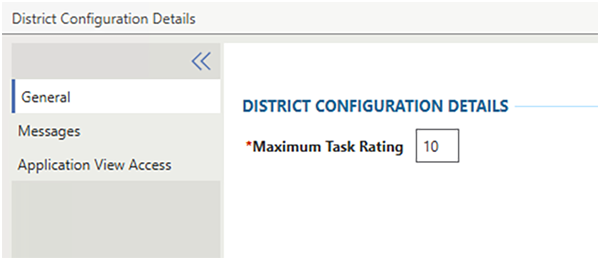
When reviewing job applications, screeners must be able to grade and identify the best available candidates. With our previous 1-5 scoring system, there wasn’t enough variance in scores to accurately determine who the top candidates were. We’ve expanded our scoring system, so now districts can select a maximum score of up to 99.To increase the maximum score from five, go to Applicant Tracking > District Configuration > General. On this screen, a Maximum Task Rating can be set up to 99. When increasing this number, previous scores will not be adjusted.
Section and Individual Question Scoring
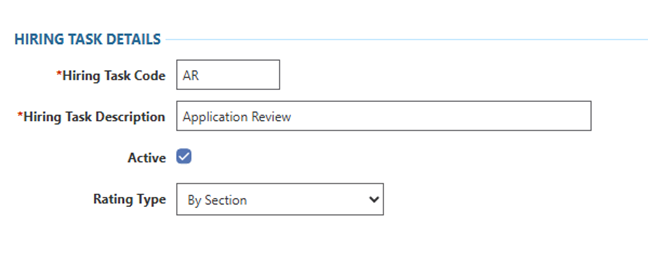
Grading an entire application can be challenging, as many factors determine whether an applicant is the best fit. Providing an application score was becoming more of a gut check than a valid score. That’s why we've expanded scoring into individual sections and application questions, so you can easily identify who is excelling in different areas.When setting up Hiring Tasks, you'll see a new option added to Rating Types. Select By Section to grade at a more granular level, shifting scoring away from an entire application to detailed application sections.
Personal and Professional References
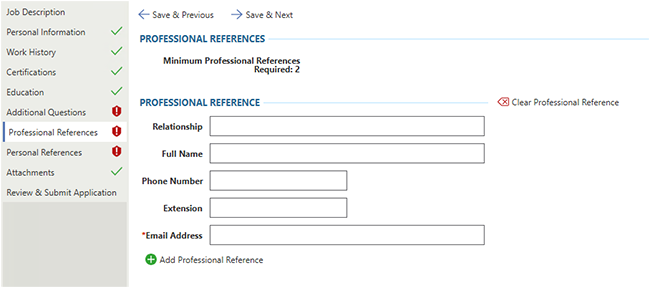
Having trouble identifying which references are professional and which are personal? Thanks to a recent update, it's now easy for screeners to tell.To set different reference type requirements, go to Applicant Tracking > Codes > Application Requirements. Within an Application Requirement, you will find two separate checkboxes in the General Tab. These will indicate if you want to require personal references, professional references, or both. You will also be able to select the minimum and maximum number of each reference required.
Screener Task Clarity
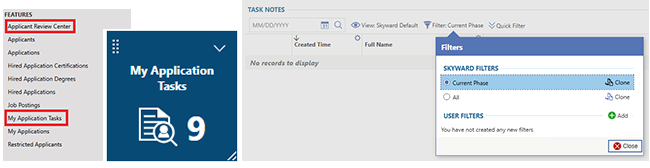
We made significant enhancements to our screening process, making it easy for screeners to see when and where to review applications.One thing you'll notice is that the role of the Reviewer is now split into two roles: Hiring Manager and Reviewer. Hiring Managers oversee advancing applicants to the next task or phase and use the My Application Tasks screen. Reviewers offer their feedback and opinions on applicants but can’t move them through the hiring process (they use the Applicant Review Center).
You can create Live Tiles for Reviewers and Hiring managers, so they can quickly identify when new applicants are assigned for review.
We hope these updates help you streamline your hiring process and select the best candidates for your school district. Happy hiring!
Follow up resource: Qmlativ Spotlight: Print Application Report Design
As part of our continued focus on improving Applicant Tracking, print applications got a sleek new design. And printing in mass got a whole lot easier.Thinking about edtech for your district? We'd love to help. Visit skyward.com/get-started to learn more.
|
Lauren Pozorski Blogger, Traveler, and Video Talent |
Lauren enjoys visiting school districts and spreading the word about creative, non-traditional approaches to universal challenges. Follow her for on-the-scene reporting (with a little fun sprinkled in) and tips on how to enjoy a better Skyward experience.