Get started
 Log in
August 01, 2019 • read

Qmlativ Spotlight: Transportation
|
Dan Grabski Product Manager |

Dan Grabski

Wouldn’t it be nice to have bus fleet details, route and stop information, and records of students linked to those stops all in one location? We think so. Not only for convenience, but also for safety’s sake.
That’s exactly what the Qmlativ transportation module offers. Let’s take a look.
Transportation Overview
One stop shop: The transportation module stores all transportation-related details in one place, making it easy to find the data you’re looking for and communicate with families and other staff members.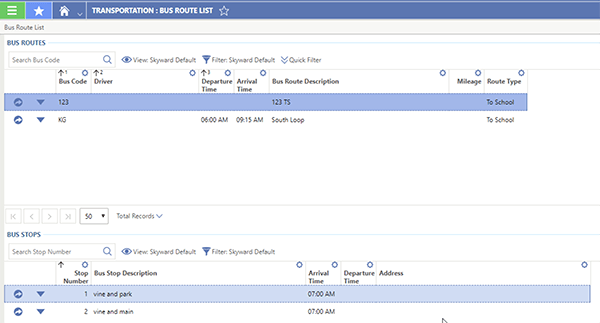
State reporting-friendly: The module contains all of the necessary fields for state reporting, so it’s easier for you to submit required reports without the hassle of searching for data in other parts of the system.
Easy to import: You can use the Import Designer to import busing information including buses, routes, stops, and student pickups and drop-offs.
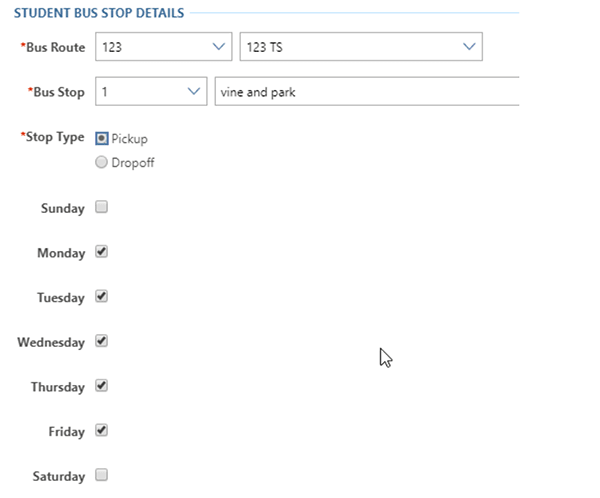
Flexible design: Want to limit students to riding specific buses? Wish you could schedule pick-ups or drop-offs for only certain days of the week? Now you can! This module is flexible—it fits your district’s schedule, so you’re not stuck trying to force your schedule to work with it.
Behind the Scenes: How We Got Here
The process of developing the transportation module began with initial research by our product management team. They talked with several of our district partners to find out what features and design would serve them best. They organized the information collected, then presented it to our development team.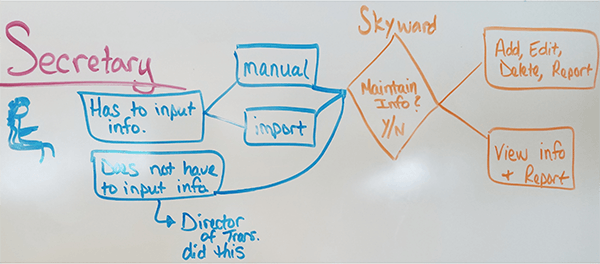
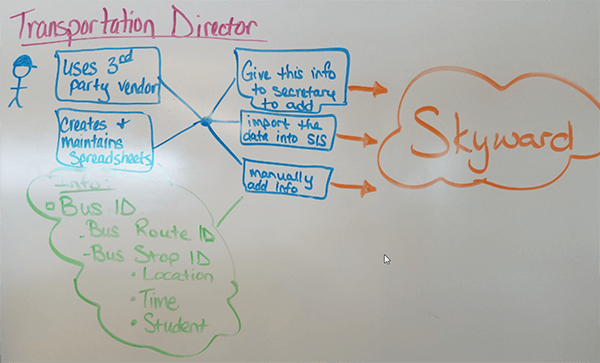
After development was complete, we went back to our district partners for feedback. Our UX team values these conversations—there’s no better way for us to ensure you get the best product than by inviting you to help design it!
We’re excited about sharing this new module with you. We hope you find it easy to use and that it helps you streamline transportation tracking!
Follow-Up Resource: We Need You
Want to help create the next big feature? Help us build a better experience by joining our User Research Panel.Thinking about edtech for your district? We'd love to help. Visit skyward.com/get-started to learn more.
|
Dan Grabski Product Manager |