School Branding With AI: Tips and Pitfalls
 BY Kaylie Wiedmeyer & Abby Paulsen
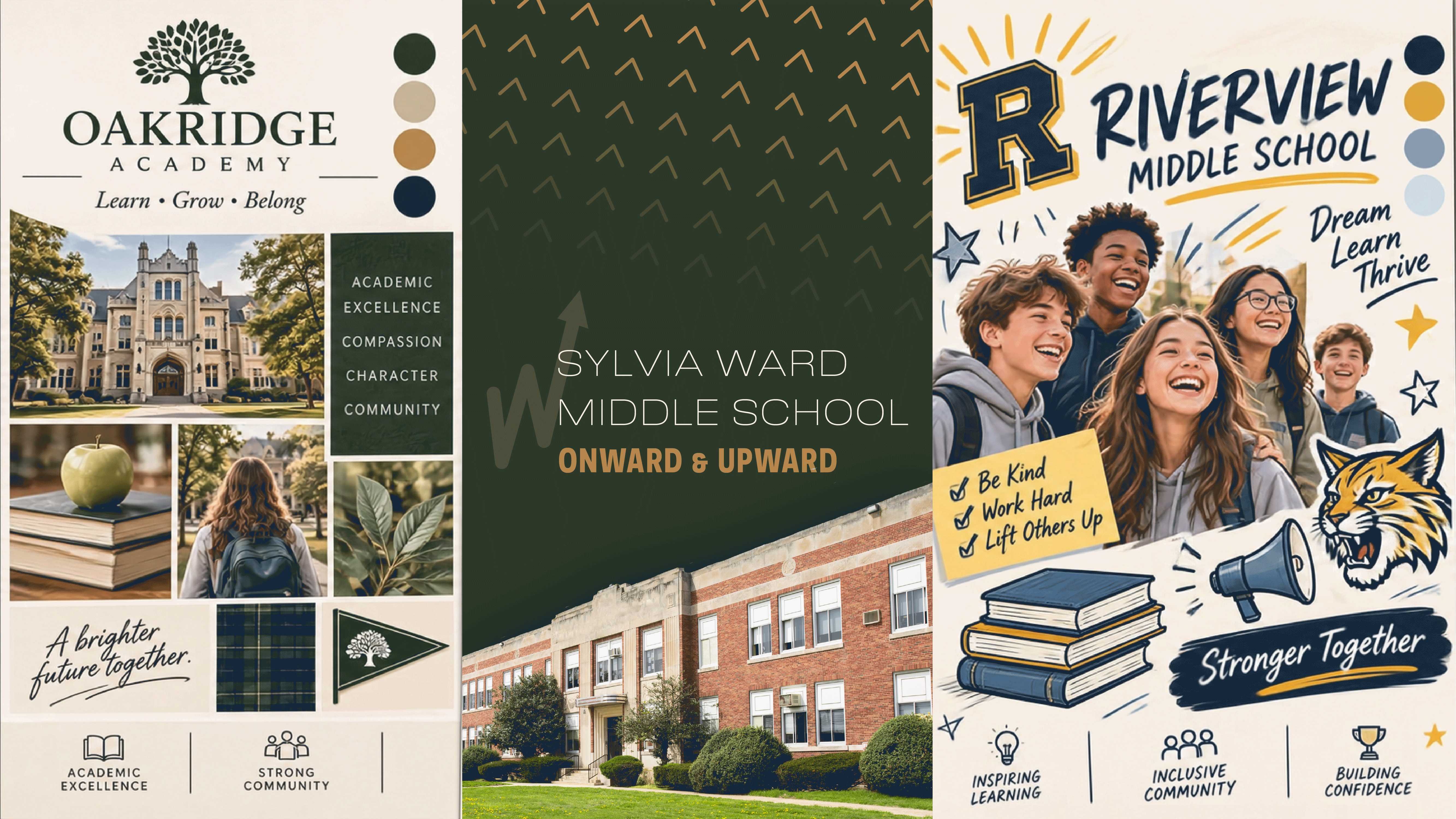
For schools, branding often means communicating in alignment with the values of educators, families, and community members. Across newsletters, blogs, social media posts, and school mascots, branding involves an intentional selection of material that tells a cohesive district narrative. From district-wide initiatives and announcements to sharing a success story, effective branding is a way for schools to share content that inspires action, participation, and engagement among their audiences.
While branding is essential for schools, it can also be a struggle to keep up with consistently. Not all schools have the time or budget for marketing positions or materials. Using AI to assist with school branding can save busy educators time while offering a flexible tool to generate ideas, designs, and templates. But as more AI content floods media channels, audiences are becoming keenly aware of what’s human and what’s not. When using AI in communication, it's important for schools to learn ways to use these tools effectively while communicating in a way that resonates with their audience.
Using AI tools for school branding: helpful tips for beginners
There are a few helpful tips for educators new to AI who want to save time but also produce good results with AI.
Take advantage of beginner-friendly design tools
For the school admin who's never learned design and doesn't know where to start, there are a few user-friendly options designed to supplement beginner skill levels.
With platforms like ChatGPT, users can opt-in for plug-ins and integrations with platforms like Canva, Google, Adobe, and more (still using the free model!). This enables users to utilize AI to generate working designs for newsletters, blog outlines, and other helpful resources. It's a good way to bring an idea to life when you don't know where to start and edit it on a preferred platform to get your desired result.
When using other AI models, such as Copilot or Gemini, try exploring design-related plug-ins available on your desired platform with your district IT department’s permission.
For those worried about the ethical implications of AI, try a more sustainable model like EcoGPT, which aims to reduce its carbon footprint by using natural bodies of water and planting trees. With alternative AI models alike, you can follow the same prompt tips and get similar results.
Using the right AI prompts
With creative work, AI prompting can be tricky. AI often does a poor job of producing original work, as it lacks human creativity, experience, and insight — all of which make up artistic vision. This is why AI serves better as a creative assistant. It can supplement certain skill gaps, but it cannot replace human discernment.
When crafting prompts for creative work, it's important to give the AI as much detail and procedural instruction as possible. Think of the prompt as bumpers in a bowling lane: it provides the AI with guardrails and a clear direction. When left up to its own devices (i.e. scarce detail, scattered and disorganized prompts, and little context), AI is more likely to produce results that stray too far from your original intent.
Example: Bad AI Prompt
Generate a newsletter template for my school's monthly newsletter. It needs to be branded, so it aligns with our school mascot and colors. It also needs to have a family-friendly tone, and include sections for announcements, highlights, and school-wide initiatives.
In this example prompt, the AI is given some useful information, but it's left to fill the gaps with its own limited knowledge. As a result, the AI may not produce something that aligns with the project's goals, potentially leading to frustration and wasted time.
Example: Good AI Prompt
I am a superintendent at a small middle school (approximately 450 students). I need help generating a new, branded newsletter template for my school's monthly newsletter, so I can engage more families in our school community. In this newsletter, I need seven sections designed in the following order: front page, monthly recap, announcements, updates on school-wide initiatives, employee highlights, upcoming events, and a contact us page. This newsletter should visually align with our school mascot, colors, and audience: families, students, board members, and educators. It should feel welcoming, warm, and friendly. The template should be a working design, so I can upload it to Canva and edit text, font, images, and other design elements. The newsletter content itself does not need to be written. This should be a template that can be repurposed for future newsletters.
In this example prompt, the AI has a clear understanding of the project landscape. They understand the prompter's role, situation, and objective while also having clear guidelines to work within. In turn, it’ll produce a design that could be uploaded to Canva, so educators can edit and personalize the details as they see fit.
Striking a balance between efficiency and authenticity with AI
When an AI model generates an image based on a prompt, it pulls information from other sources across the web. Some of those images might be free to license, but oftentimes they’re copyrighted, which can be a cause of concern for school branding. Not to mention, plagiarism and exaggerated AI-phrases can make a design inauthentic to the reader. In the long run, the effects are felt by AI-fatigued audiences and can create distrust.
Most of us have become familiar with the "AI slop" posters and social media posts. As a result, humans are becoming more selective for content that feels human-generated. It's important that schools share their story in a way that resonates with our desire to connect authentically.
Here's a few ways educators can make sure their school's voice doesn't disappear in a series of AI prompts and outputs:
Use previous content as a reference: When prompting, uploading previously made content can serve as a helpful example for the AI. Be mindful that the content is free to license or already owned by your school; otherwise, you may encounter copyright issues.
Upload your school's brand guide: Brand guides typically outline preferred color palettes, tone, font styles, and more. If your school has a brand guide, try uploading it as an attachment. This will give the AI a clear understanding of which design elements to use.
Incorporate your school's voice: Make sure your messaging — word choice, tone, and structure — is consistent with your school's voice. When using AI-generated copy, revise it to make sure it reads authentic rather than fake.
Keep it cohesive: When using AI to create, be mindful of basic design theory:
- Use harmonious colors and fonts.
- Avoid cluttered information and needless phrases, so your message comes across clearly.
- Make sure your design includes a good use of positive and negative space.
Finding alternatives to AI branding
ChatGPT and Gemini aren’t the only options to quickly create quality designs.
School branding: starting from scratch
Alternatively, you can use Canva or similar apps without AI assistance, as a free design tool for schools if you don’t already have an Adobe subscription.
First, you’ll want to make a template for your school labeled as your branding guide. Then, you can import existing images of your school’s logo, mascot, font type, colors, and more. Having your school’s brand guide in one place makes it easier to copy and paste what you need onto new designs.
With Canva’s user-friendly platform, you can use existing templates, shapes, and graphics and add them to your desired design, whether that be a flyer, mailer, web image, or even a t-shirt.
Increasing student involvement with design competitions
In efforts to abstain from AI or burdening staff, schools could host student-led design competitions or ask student artists or writers for their input. Give students a few weeks to be creative, and they might surprise you, especially at the middle school level.
This not only gives students the opportunity to see the real impact of their collaboration and imagination but also gives them something meaningful to write on their resume. Inspire the next future content marketer, web designer, or graphic designer.
Don’t feel pressured to rush into new tech trends if the old-school methods are still working. But, if you think it’s time to try something new with your school’s brand, keep this guide handy. With good human judgement and editing, AI designs can be a time-saver for staff members that wear multiple hats. Inputting your school’s brand guide, editing throughout the process, and adding small human touches to your AI design can be a great aid in avoiding inauthentic AI outputs.
Remember: The goal of branding is to communicate and connect with your target audience and community. Share who you are as a school — your culture, mission, and values — through confident and concise branding
WHAT'S NEXT FOR YOUR EDTECH? The right combo of tools & support retains staff and serves students better. We'd love to help. Visit skyward.com/get-started to learn more.
|
Kaylie Wiedmeyer & Abby Paulsen Edtech Thought Leaders |